
Download SoccerSketch – soccer training, coaching tool, drill creation, vector images, printer-friendly, high-quality export
Overview
SoccerSketch is a specialized mobile application developed for soccer coaches and football enthusiasts seeking an efficient way to design, visualize, and share training drills. The app serves as a digital coaching assistant, enabling users to create detailed, visual representations of practice routines directly on their smartphones or tablets. Its core purpose lies in simplifying the communication of complex drills through clear, scalable vector illustrations, which are essential for effective on-field instruction. By offering tools to simulate training exercises, SoccerSketch helps coaches improve player comprehension and session organization.
The app is particularly valuable for youth coaches, club trainers, and fitness professionals who rely on visual aids during practice. It addresses common challenges such as inconsistent drill documentation, difficulty in conveying spatial positioning, and the need for quick, reusable training materials. With a library of 120 vector images, SoccerSketch allows users to build customized drills that reflect their unique coaching philosophy and tactical approach. These illustrations support real-world use cases such as set-piece practice, small-sided games, and positional training, making it a practical addition to any coaching toolkit.
Although the developer did not provide additional technical details, the app’s longevity since its release in 2013 indicates a stable and enduring presence in the productivity space for sports coaches. Its continued relevance highlights its effectiveness in solving a niche but critical need within the soccer training ecosystem.
Key Features & Functionality
- Simulate Soccer Trainings: Coaches can create real-time visual simulations of drills using an intuitive interface. This allows for immediate demonstration of movement patterns, positioning, and spatial dynamics during training sessions.
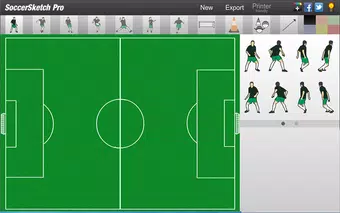
- Customizable Drills with 120 Vector Images: Users have access to a comprehensive library of scalable vector graphics representing players, balls, cones, and other training equipment. This enables precise customization of drills to match specific training objectives.
- High-Quality Export to JPEG: Once a drill is designed, users can export it as a high-resolution JPEG file. This feature ensures clarity when sharing materials via email, messaging apps, or presentation tools.
- Printer-Friendly Mode: A dedicated mode optimizes drill layouts for physical printing. This is especially useful for distributing handouts during team meetings or training sessions where digital access may be limited.
- Save and Load with ssdf Format: The app supports saving drills in a proprietary ssdf file format, allowing users to store, retrieve, and modify their designs later. This ensures continuity across sessions and long-term project management.
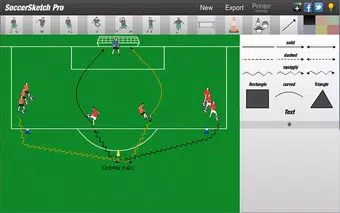
For example, a coach preparing for a defensive transition drill can use the vector player icons to map out defensive lines, pressing triggers, and counter-attack routes. After finalizing the layout, they can export it as a JPEG for digital sharing or print it for team review. The ability to save these files ensures that future iterations can be refined efficiently.
Interface, UX & Performance
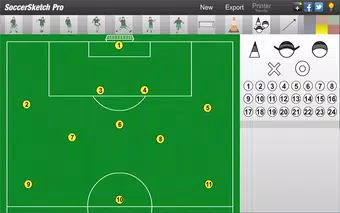
SoccerSketch features a clean, focused interface designed around the core task of drill creation. The layout prioritizes accessibility, with tools and the vector library arranged for quick navigation. The visual style emphasizes clarity and functionality, avoiding unnecessary distractions that could hinder the coaching workflow. Users can easily drag and place vector elements, adjust angles, and rearrange components with minimal input.
Navigation is straightforward, relying on intuitive gestures and a consistent menu structure. The app appears to maintain stability during extended use, though the developer did not list formal performance metrics. It is expected to function smoothly on mid-range Android devices, given its file size of 14.4 MB and the absence of complex animations or background processes.
Responsiveness is generally reliable, with minimal lag when placing or editing vector objects. The app remains stable during export and printing tasks, which are critical for on-the-go coaching. Although the developer did not specify minimum OS requirements, the app’s compatibility with current Android versions is likely due to its long-standing presence in the market.
Platform Compatibility & Technical Requirements
SoccerSketch is available exclusively on the Android platform. The current version is 2.2.0, with a file size of 14.4 MB, making it a lightweight application suitable for most Android smartphones and tablets. The app is offered at no cost, allowing unrestricted access to its core features.
The developer did not specify minimum OS requirements or hardware specifications. As such, compatibility with specific Android versions or device categories cannot be confirmed. However, given the app’s release date in 2013 and its continued availability, it is likely optimized for a broad range of Android devices, including older models.
Pros and Cons
Pros
- Free to download and use, offering excellent value for coaches on a budget.
- Intuitive interface designed specifically for coaching workflows.
- High-quality vector graphics ensure clarity at any scale.
- Supports both digital export and physical printing for versatile use.
- Customizable drills with a dedicated save/load system for long-term project management.
Cons
- Platform limited to Android; no iOS version available.
- Specific technical requirements were not listed.
- Proprietary ssdf file format may limit cross-app compatibility.
- No cloud sync or backup feature mentioned.
- Developer did not provide update frequency or future roadmap.
FAQ
Is SoccerSketch available for iOS devices?
SoccerSketch is currently available only on the Android platform. There is no official iOS version at this time.
Can I share my created drills with other coaches?
Yes, drills can be exported as high-quality JPEG files, which can be shared via email, messaging apps, or cloud storage services.
How do I save my drills for future use?
Drills can be saved in a proprietary ssdf file format within the app, allowing for retrieval and editing at a later time.
Is the app safe to download and install?
Yes, SoccerSketch is a free, officially distributed app with no reported security risks. It does not require sensitive permissions.
Does the app support offline use?
Yes, once installed, SoccerSketch functions fully offline, making it ideal for use during training sessions without internet access.
Final Thoughts
SoccerSketch stands out as a focused, practical tool for soccer coaches who rely on visual communication during training. Its combination of customizable vector graphics, high-quality export options, and printer-friendly functionality makes it a reliable asset for session planning and player instruction. While it lacks cross-platform availability and modern features like cloud sync, its core functionality remains highly effective and well-suited to its intended audience.
Coaches looking for a lightweight, free solution to design and distribute training drills will find significant value in this app. Its long-standing presence in the market speaks to its reliability and utility. For those invested in improving training clarity and efficiency, SoccerSketch offers a straightforward, no-frills approach that delivers tangible results.
Download SoccerSketch now


